Overview
Sometimes, it’s more cost-effective for Walmart Marketplace sellers to let customers keep an item and process the refund than it is to pay a return shipping fee. This makes sense for items purchased on Walmart.com that can’t be returned, such as groceries or medical supplies.
On Walmart Marketplace, you can adjust your return settings to define “Keep It Rules” for certain non-returnable items. This rule allows customers to keep the item and get a full refund.
You cannot apply Keep It Rules for returns initiated in Walmart stores.
Add Keep It Rule
1. Open Walmart Seller Central.
2. Log in to your account with your Email and Password.
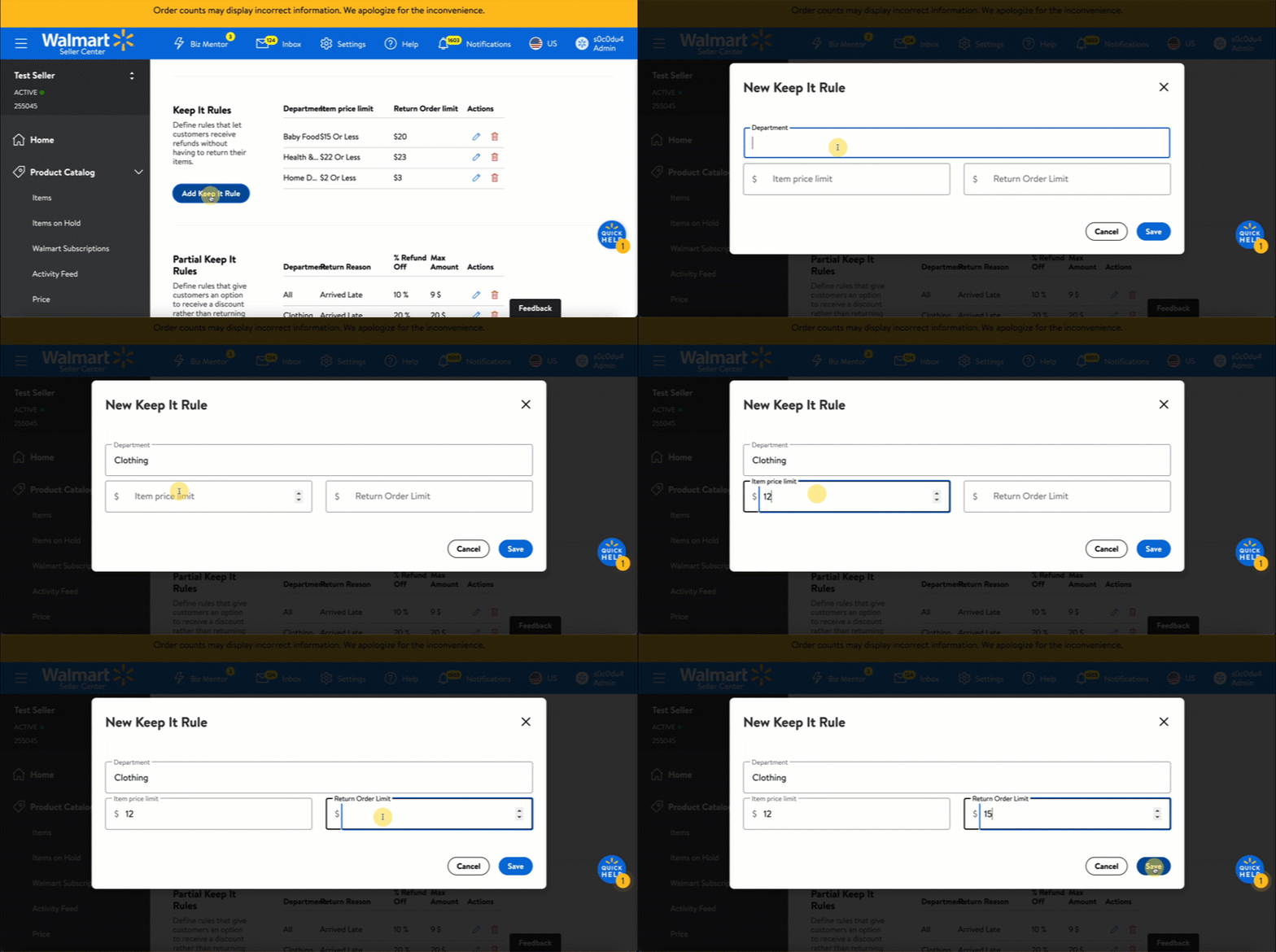
3. Click the Add Keep It Rule button.
4. Configure your Keep It Rule by Department, Item price limit, or Return Order Limit. Once completed, click the Save button.
You also have the option to set item-level Keep It Rules for SKUs that are not included in a specific Department or don’t meet your Item Price limits. Do this by submitting a Bulk Return Rules spec sheet. Please allow four hours for the system to process your spec.
Source: Knowledge Base from Walmart.com
DOC3894.2
Comments
0 comments
Please sign in to leave a comment.